
Google AI Edge Gallery
Screenshots
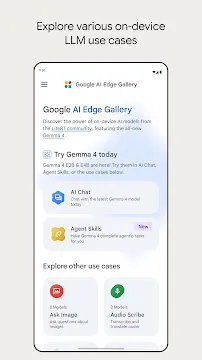

Google AI Edge Gallery provides a fantastic playground for mobile machine learning enthusiasts. Developers and technology lovers can now test advanced large language models locally on mobile hardware. The open-source project lets users interact with highly optimized artificial intelligence models without an internet connection. This interactive environment runs entirely offline to ensure complete privacy for your text, image, and voice inputs.
The software eliminates the need for expensive cloud servers. It processes heavy data workloads locally by leveraging the physical processor and graphics chip inside your device. Users can experience fluid interactions because the system minimizes typical network delays. This setup allows anyone to explore cutting-edge intelligence structures directly in the palm of their hand.
Discover On-Device Intelligence with Google AI Edge Gallery
Google AI Edge Gallery shifts how mobile devices handle advanced artificial intelligence tasks. The software acts as a local environment where users can load open-weight models directly. Because everything operates locally, you never have to send personal logs to external systems. The interface utilizes LiteRT-LM frameworks to maintain fast processing speeds during intense reasoning tasks.
The system relies heavily on the internal hardware capabilities of your mobile device. High-end processors handle the computational demands smoothly. Then, the localized system allows for continuous interactions. This framework represents a massive leap forward for open-source mobile development.
Explore Advanced Capabilities in Google AI Edge Gallery
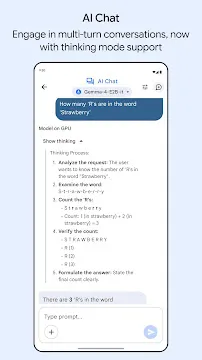
Google AI Edge Gallery offers deep functional experiences through multiple specialized workspaces. One standout feature is the interactive text chat area. Users can activate a specific thinking mode to view the step-by-step logic of the underlying model. This transparent view reveals exactly how the machine reaches its final answers.
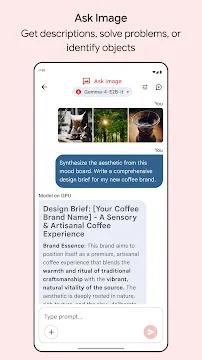
The software also excels at multimodal processing. For example, you can take a picture or upload an image to identify objects instantly. The voice workspace transcribes spoken words into text in real time. This combination of tools makes the software incredibly practical for daily testing.
- Prompt Lab: Tweak precise settings like temperature and response length to test specific text strings.
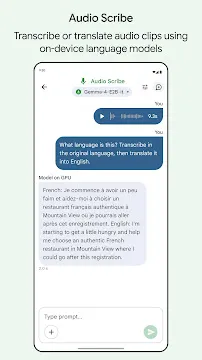
- Audio Scribe: Convert continuous voice recordings into structured text files instantly.
- Ask Image: Scan physical items or solve puzzles using your mobile camera lens.
Build Custom Routines Using Google AI Edge Gallery
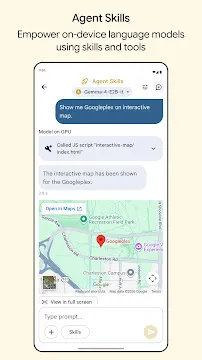
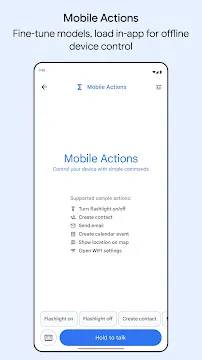
Google AI Edge Gallery supports custom modular tools known widely as agent skills. These skills expand what the base language model can achieve. The system connects the intelligence model to offline tools like local encyclopedias, maps, and calendar feeds. Therefore, your digital assistant can execute actual tasks instead of just chatting.
The community can build and share these skills through plain instructional files. The local model reads the available skills. Then, it automatically triggers the right tool when you make a specific request. This unique approach allows you to build a highly personalized mobile assistant.
Experience Total Privacy with Google AI Edge Gallery
The App places user security above everything else. Traditional artificial intelligence tools process your personal inputs on distant company servers. This software changes that dynamic completely. Every single calculation happens on your physical device hardware.
Your data remains safe from external breaches because it never leaves the local storage. This secure framework makes the system ideal for analyzing sensitive work files or private journals. Furthermore, the tool operates perfectly in remote areas without cellular data coverage. You retain complete ownership and control over your data.
Optimize Local Hardware
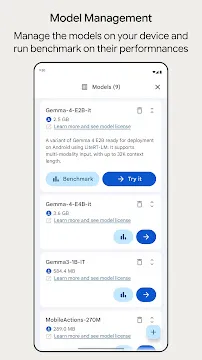
Google AI Edge Gallery includes built-in benchmarking features to test local performance. Mobile chips vary wildly in computational power. The software allows users to run speed tests on their exact hardware configuration. You can see how many word tokens your device generates per second.
This diagnostic tool helps you select the best model variant for your specific device. Lighter models run incredibly fast on mid-range hardware. Meanwhile, larger versions deliver deeper reasoning on premium chips. The software gives you the exact data needed to balance speed and accuracy perfectly.
Conclusion
Google AI Edge Gallery delivers a secure sandbox for the future of offline mobile intelligence. By running powerful language models locally, the software protects user data while eliminating cloud subscription fees. The inclusion of customizable agent skills allows anyone to build helpful tools. Developers can study the open-source code to improve their own mobile software projects. Download the tool today to experience private, lightning-fast machine learning on your own device.